
Automated Remediation.
You're Still in Control.
CloudHiro continuously scans 140+ resource types, generates savings recommendations, and acts on them automatically — or waits for your approval. You decide how much to automate.
From scan to savings — on your terms.
CloudHiro closes the full remediation loop while keeping your team in control at every step.
Deep Scan
CloudHiro continuously analyzes every resource across 140+ Azure service types, matching usage patterns against historical workload performance.
AI Recommendation
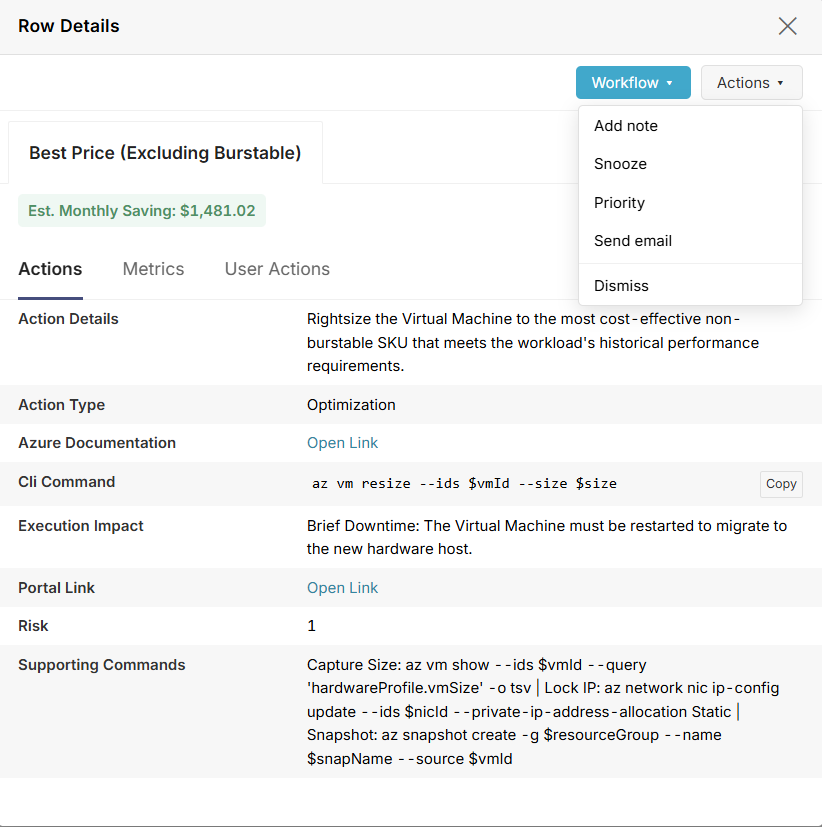
Each finding comes with a specific action, estimated saving, CLI command, execution impact, and risk level — so you always know exactly what will happen before anything does.
You Choose the Mode
Approve individually, snooze, add notes, or set fully automated execution rules. One-click approval or hands-off automation — your policy, your call.
Action + Audit Trail
CloudHiro executes the remediation and automatically creates a Jira ticket, syncs to ServiceNow, and logs the full audit trail. Nothing happens in the dark.
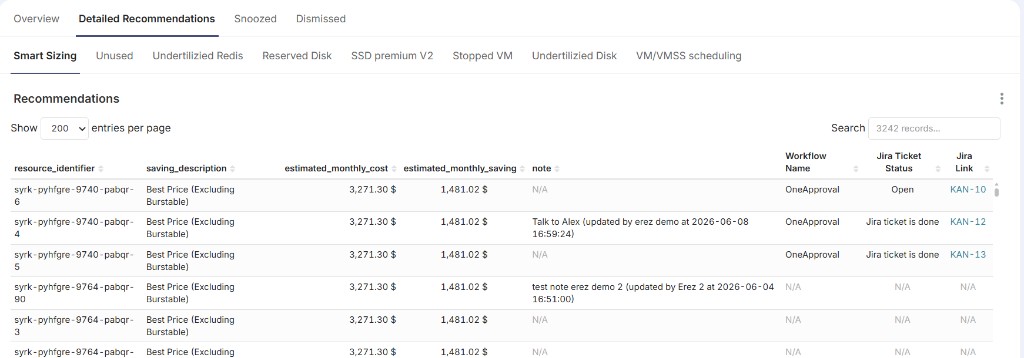
See remediation in action.
From your full recommendations queue to the exact action behind each optimization — savings, CLI, impact, and control in one place.
Automation that works the way your team does.
Fully Automated or One-Click
Deep scan finds the waste. You decide if CloudHiro acts automatically or waits for approval. Either way, nothing gets missed.
Outcome: Zero remediation toil. Full policy control.
140+ Resource Types. Continuously.
Not a one-time scan. CloudHiro analyzes every resource type across your Azure environment on an ongoing basis, surfacing new savings as your infrastructure changes.
Outcome: Savings don't stop when the project does.
AI-Powered Recommendations
Every recommendation includes the exact action, estimated monthly saving, CLI command, execution impact, and risk level. No guesswork, no surprises.
Outcome: You know what will happen before it does.
Smart Filtering
Surface only the recommendations that matter. Filter by resource type, saving size, risk level, or team — so the right people see the right findings.
Outcome: No noise. Just actionable signal.
Flexible Actions
Approve, snooze, intervene, or add notes to any recommendation. Full control at every step, even in automated mode.
Outcome: Automation that respects your workflow.
Native Integrations
Jira tickets auto-created on approval. ServiceNow and Slack connected out of the box. Audit trail synced automatically.
Outcome: Fits into how your team already works.
Most waste cleanup tools stop at detection. CloudHiro closes the loop — finding the waste, recommending the fix, and executing it automatically while keeping your team in full control of every decision.
Stop Finding Waste. Start Eliminating It.
CloudHiro automates the full remediation loop — from deep scan to execution — without taking control away from your team.